FAQ
How do I sign up?
You can sign up via the /signup page. You will then receive an email from <onboarding@mail.weekly-log.com> to verify your account before signing in, which you can do by clicking the link in the email body.
If you cannot locate the email anywhere, or it has been over 24 hours since the last email was sent, you can generate another verification email via the /check-email page.
Is my password safe?
Weekly Log does not store your password as written. A bcrypt hashing function is used to create a hash of your password, which is what gets stored in the database. Hashing can only be done one way, meaning your password cannot be reverse engineered from the hash. This means even Weekly Log's database administrator cannot determine your password.
When you sign in, your attempted password is hashed and compared to the hash stored in the database. This password attempt is not permanently stored anywhere.
The biggest threat to your account is using a password that you use in other places, or one that could be easily guessed or brute-forced. It is always recommended to use unique, strong passwords, and store them securely.
How often can I post?
That said, if you have not already done so that week, you can delete the current week's post and get a second attempt, either starting fresh or reloading the deleted post as a draft.
See question "Am I able to edit a post I submitted?" for instructions on how to reload the post.
Am I able to edit a post I submitted?
Important caveats:
- You must delete your post from this week to post again this week. Deleting posts from previous weeks will not allow for edits and reposts.
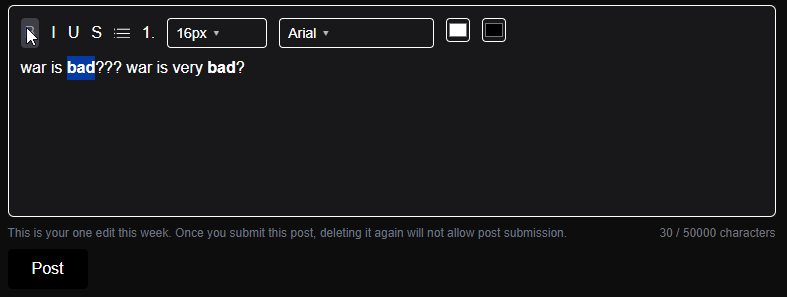
- If you have already edited and resubmitted your post once this week, the submission button will not reopen if you delete it again. You are only allowed one edit per week.

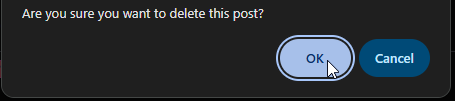
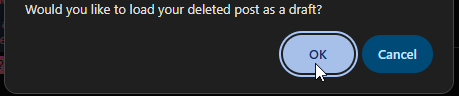
Now you may edit your post from before, noting the message to the bottom-left of the post editor.
What defines a "week"? When does the week reset?
For you, that translates to: Monday, 12:00AM UTC
So after making a post, you do not have to wait a full 7 days before submitting another.
You just have to wait until the weekly reset time, when everyone's submission button unlocks again 😀
Can other users see what posts I like?
Nobody can see that you liked a post besides you and the user who made the post.
How do I share my logs with the world?
Select your post's options, and click on Post Privacy. You can then click the Public option, which allows anyone on the internet to see your work.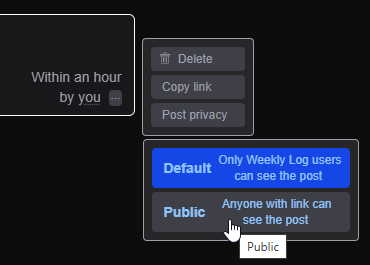
After publicizing your log, you can copy and share its link. Your log will now also appear on the homepage feed when signed out.
Can other users see who I follow & who follows me?
Nobody can see a list or a count on who you follow, or who follows you.
If you follow a user, they can see you as a follower on their profile. But nobody else can.
Can I save a draft of my log, and finish it later?
No need. As you type your post, a draft will be saved automatically 🙂
You're welcome to sign out or navigate away from the page, and your draft should be waiting for you when you come back.
Is there a limit to how long my log can be?
There is a 50,000 character limit on posts.
This very roughly equates to ~8000-9000 words, or ~15-20 pages in a document editor tool.
This limit does not include the HTML characters used to display RTF; it counts only characters you type.
Can I include images and videos in my posts?
No. Posts are strictly text-based, and cannot include pictures and videos.
The aim of this limitation is to retain simplicity, shift the focus of the website's content toward thought, and reduce the mental clutter of scrolling through many images and videos.
How do I format my ASCII art?
Font: Courier New
Spacing: None
:D
How can I request permanent deletion of my account and/or posts?
Locate the site contact via the /contact-us page.
Please make sure to reach out from your account email, and specify what you would like to be deleted.
You will be sent another email that prompts you to confirm your data deletion, out of an abundance of caution. After you confirm, we will permanently delete the requested data.